What Is IPTV?
Television has changed significantly in recent years. Traditional cable and satellite services are no longer the only ways people watch their favorite programs. With faster internet connections and smart devices, many viewers are moving toward internet-based entertainment solutions.
One of the technologies behind this change is IPTV (Internet Protocol Television).
But what is IPTV exactly? How does IPTV work? What devices can you use with it?
In this beginner’s guide, we will explain everything you need to know about IPTV technology and how it is transforming modern television viewing.
What Does IPTV Mean?
IPTV stands for Internet Protocol Television.
Unlike traditional television systems that use cable, satellite signals, or antennas, IPTV delivers television content through an internet connection using Internet Protocol technology.
Simply explained:
IPTV allows users to watch television content through the internet instead of traditional broadcasting methods.
The content can include:
- Live television channels
- Video-on-demand services
- Recorded programs
- Time-shifted television
The main difference is the delivery method. Instead of receiving a signal from a satellite dish or cable line, IPTV sends video data through internet networks.
How Does IPTV Work?
WHAT IS IPTV
Understanding how IPTV works is easier when you compare it with traditional television.
Traditional TV:
Broadcast Station
↓
Satellite/Cable Network
↓
Television
IPTV:
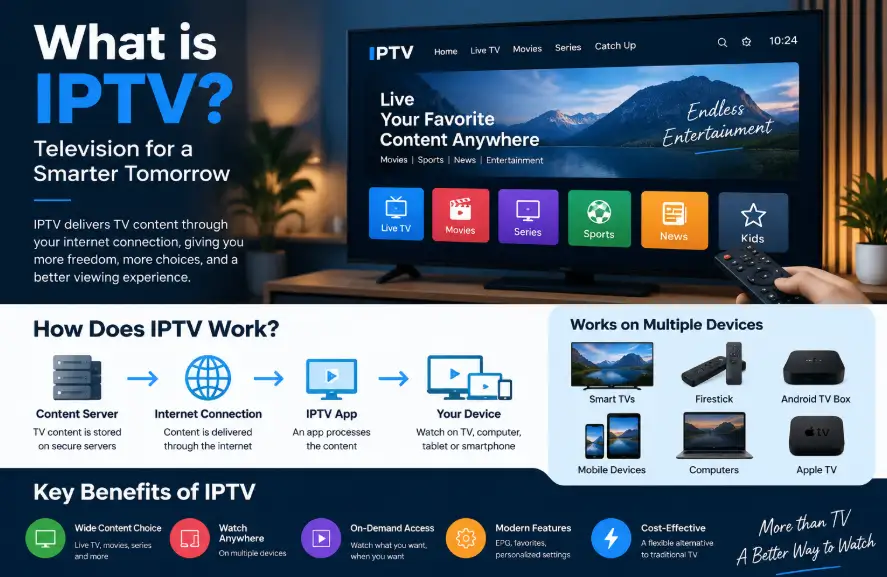
Content Server
↓
Internet Connection
↓
IPTV Application
↓
Smart Device
When a user selects content, the IPTV system sends the requested video data through the internet. The IPTV application then processes and displays the content on the user’s device.
This technology uses streaming protocols that allow video content to be delivered continuously without downloading the entire file first.
Types of IPTV Services
There are different types of IPTV services depending on how content is delivered.
1. Live IPTV
Live IPTV allows viewers to watch television programs in real time, similar to traditional live television.
Examples include:
- Live news
- Sports broadcasts
- Entertainment channels
- Events
2. Video on Demand (VOD)
Video on Demand allows users to choose movies, shows, or other videos whenever they want.
Instead of following a fixed broadcast schedule, viewers select content from a digital library.
3. Time-Shifted Television
Time-shifted IPTV allows users to watch previously broadcast programs.
Examples:
- Catch-up TV
- Replay programs
- Recorded shows
4. Better User Experience
Many IPTV applications provide features such as:
- Electronic program guides (EPG)
- Search functions
- Favorites lists
- Personalized settings
What Internet Speed Do You Need for IPTV?
The required internet speed depends on video quality.
General recommendations:
| Quality | Recommended Speed |
|---|---|
| SD Quality | 3–5 Mbps |
| HD Quality | 5–10 Mbps |
| Full HD | 10–15 Mbps |
| 4K Streaming | 25 Mbps or higher |
A stable internet connection is often more important than just high speed.
Common IPTV Problems and Solutions
IPTV Buffering
Buffering can happen because of:
- Slow internet connection
- Network congestion
- Device performance
- Server issues
Possible solutions:
- Check your internet speed
- Restart your router
- Use a wired connection when possible
- Update your application
IPTV App Not Working
Common fixes:
- Restart the application
- Check device compatibility
- Update the app
- Verify network connection
Is IPTV Legal?
The technology behind IPTV is legal. IPTV is simply a method of delivering television content through internet networks.
However, the legality of a specific IPTV service depends on whether it has the necessary rights and permissions to distribute the content it provides.
Users should always check that the service they choose operates legally and respects content licensing requirements.
Frequently Asked Questions About IPTV
What does IPTV stand for?
IPTV stands for Internet Protocol Television, a technology that delivers television content through internet networks.
Do I need a Smart TV for IPTV?
No. IPTV can work on many devices, including smartphones, computers, streaming devices, and smart televisions.
Does IPTV require internet?
Yes. IPTV requires an internet connection because content is delivered through online networks.
Is IPTV better than cable TV?
IPTV and cable TV offer different experiences. IPTV provides internet-based flexibility, while traditional cable relies on broadcast infrastructure.
The best option depends on the user’s viewing preferences and available services.
Conclusion
What is IPTV: It represents a major change in how people access television content. By using internet technology instead of traditional broadcasting methods, IPTV provides a flexible viewing experience across multiple devices.
Understanding What Is IPTV, how IPTV works, and what devices support IPTV is the first step for anyone interested in modern television technology.
As internet speeds continue improving, internet-based television solutions are expected to become an increasingly important part of digital entertainment.